Software for remote access, remote desktop, remote administration and administration - Remote Administrator Control
Page Content
RAC Client - News in the version:
5.0.3 - 5.0.9
5.0.12:
optimization of saving connections in RAC Client
optimization of exports
5.0.7-11:
Index and LFU cache optimization
optimization of connection to VPC server
logging optimization
optimization of the communication protocol
remote print also allows printing to printers that use PDF printing format.
For the correct function, the version 5.0.7.0 or higher RAC Client and server .
5.0.6 :
End distributing a version that does not support the unicode character set.
Remote installation. If the service is disabled, before remote installation of RAC Server. After the installation is completed, the service is restored to its original state, eg RemoteRegistry.
5.0.3 :
With operational reasons The VPC server will not allow connections from older versions of RAC Client version 5.0.2 and below, on RAC Server 5.0.2 and below. In this case, you need to upgrade to the new version of the 5.0.3 RAC Client or RAC Server.
5.0.2
a new version of the installer, which allows you to remove all settings and data created during program use during uninstall
when the when the RAC Client runs, the initialization process is displayed
change the settings and data saving when installing RAC Client / Client Lite to the default system folder: program files.
The settings and data are stored in the user profile in the AppData \ Local \ PCNetSoftware folder.
You can open the settings and data folder in the new menu in the menu: Settings-> Open the folder where the settings are saved.
For existing installations, the settings are saved by system and UCA settings, either directly in the installed folder or
in VirtualStore (AppData \ Local \ VirtualStore \ Program Files \ PCNetSoftware \).
Alternatively, migrate the existing settings by moving the folders: Data, ChatHistory, MessagesHistory, RemoteInstall, ScreenRecording and Setting
to AppData \ Local \ PCNetSoftware \ RAC Client or AppData \ Local \ PCNetSoftware \ RAC Client Lite.
Before moving, you need to quit all instances of the program.
If the settings and dates are common to all users, the application does not need to be installed
to the default system folder: program files.
RAC Client Lite has modified the main window with the option of entering a computer name or IP address according to the connection type.
changed the HTTP protocol for HTTPS secure protocol links.
Over time, websites will only be accessible through secure HTTPS.
5.0.1
connect your computer to multiple VPC accounts, the help is here
5.0.0
the ability to control a computer connected to VPC via Web Browser.
Help and conditions are listed here.
4.0.9
support for Windows 10
ability to import and export of computers connected to VPC
less information on computers for faster selection of the connected computers to the VPC
4.0.7
At full control for enabling remote users to log off when the connection is lost. It is used eg. In cases where the administrator starts as a normal user program under higher privileges. And it is possible to avoid taking control of the higher authority to the remote user in loss of control of a remote computer.
Fixed a problem that happens when it is fully operating on Windows 8, which sometimes occurs after logging in to blacken the screen and only help re-establish the connection
4.0.6
for: Full Control enabled:
adjust the display resolution remote
enter display any percentage in the new dialog: Display in percentage
when the percentage shown no such significant distortion
repair:
Fixed remote registration license
fixed displaying some of the texts
4.0.5
Ability to set the number of retries connection
Support for Unicode characters, yet they are in the distribution of two versions of the non-Unicode and Unicode support. With the procedure, time will only version available with support for Unicode.
4.0.4
For services "Send message" able to send the same message to multiple selected links
Support for Windows 8
Able to sort the list by all accented characters
When connecting to the VPN check is performed and reconnecting blocked connections mannered network protocol error
4.0.1
VPC Server optimisation in case of system failure
possibility to update later licence details remotely.
Licence details update can be set in the RAC Client in the main settings on the RAC Server Registration tab.
4.0.0
The File Transfer service:
folder synchronisation
Remote print:
print set in a way it does not add the remote printing from local PC to remote PC shortcut
3.8.0
connection via VPC:
A new menu "Connection via VPC" is added to the main menu in RAC Client/Client Lite
possible setting of statistics saving
possible statistics download in the CSV and HTML format
for Transfer of Files:
access to connected network units and other units connected under the logged in user.
In the previous version, the service was only connected to the "System" account. Network units connected
by the user are not available under this login. The service may also be connected to logged in sessions
in this version. This possibility is disabled for the existing connection but is enabled for all connections
in the new main settings. The new settings for the service are located on the new folder "Transfer of Files"
in the main settings. Settings for individual connections may be changed in the default or specific profile
for the "Transfer of Files".
3.7.1
Full control and viewing:
top panel highlighting during reconnecting corrected
Remote print:
transfer of print files adjusted based on the transfer rate
connection expiring in case remote PC gets in the sleep
or economy mode adjusted
Chat:
shifting lines after pressing ENTER (shift to a new line) directly in the text corrected
3.6.3
connection via VPC:
possibility to show computers connected to VPC if the required computer is not
connected to VPC
3.6.2
connection via VPC:
disconnection from the VPC System adjusted when the remote computer is switched to the sleep mode
3.6.1
display of the Chat window when longer text is inserted by a remote user corrected
Full control and viewing:
combination of Ctrl+Alt+C and Ctrl+Alt+V keys for box transfer;
they are enabled only through the left Alt - since
the right Alt is used in some languages for quick inserting of a special character.
Automatic connection restoring. Connection is being restored in the existing window.
Connection is also restored for the "Loading" service.
Connection is restored in case:
switching between user accounts
user logout
connection loss
remote computer is disconnected from VPC
3.6.0
Optimization for Windows 7.
New technology of sending the combination of Ctrl + Alt + Del for Windows Vista and highers.
For connecting via VPC:
The possibility of mass changing the password on all connected computers to the VPC in RAC Client and Server.
A new informational message: change of e-mail address.
Full control or Viewing Only
Possibility to change the keyboard F12.
Possibility display the text on locked screen.
French localization
Portuguese localization
Italian localization
3.5.0
computer control without public IP address through our new
VPC(Virtual Private Connection)
computer control without public IP address or fixed IP address
no need to set firewall and router
possible operation of own Virtual Private Connection
Test of the video driver functionality added
which handles the activation or switching off video drivers in case of malfunction.
This problem is mostly caused by executing DOS console applications on fullscreen.
Computer turn off service options:
Hibernation
Stand by
3.4.1
Spanish localization
German localization
new tool panel at the File transfer service
3.4.0
favourite folders at the File Transfer service
history administration at the File Transfer and Command Prompt service
Full control or Viewing Only
Speeding up the control of a remote computer through a newer technology.
The new technology obtains information on remote desktop changes quicker with lower processor and memory load.
toolbar simplification and new icons in toolbar with the option to set the size up to 32 pixels
full screen mode also available at smaller display resolution on a remote system compared to the local one
new LFU buffer
3.3.1
Enabled setting for disabling desktop background even in the Viewing Only and Recording modes
Layered windows properties moved to a new tab Upper Layered Windows
3.3.0
The possibility to switch off the desktop background in the process of control.
The possibility to switch the Connection Properties dialog for setting
only basic properties or to extended setting.
In the Properties of Remote Control dialog the Automatic Setting
tab was changed to Performance, and the related tabs were put to this tab.
The tab was changed to allow setting most of the properties related to performance.
Furthermore the Buffer tab was added to this dialog and the properties from the basic tab.
were moved there. Also Desktop and Effects tab was added.
3.2.0
Chat:
Allows communication with a remote user through text messages
Optional to set:
Opening address
Name displayed
Text properties:
Message font and colour sent and received
Background colour
Close the Chat window on the remote computer after terminating the connection
Save the messages automatically after completion
Send messages to an e-mail
Save messages to a file
Sending message to remote computer:
Allows to send a text message in the RTF format to the remote user
which allows to set:
Type, size, style, face, alignment and font colour
Highlight colour and background
Optional to set:
Transparency
View in a maximized window
Preserve the size of a window set in the preview
Sent the confirmation about reading the message
Save a sent message automatically for further use
Preview option before sending
The recipient may:
Visit a related website
Save the message to a file
Using the current appearance of Windows®
Transfer of hot keys of Windows® system
Option automatically place to the right part of the Taskbar (Notification Area)
The option to set the automatic transfer data of clipboard
Displaying cursor in the real mode
English localization
3.1.1
Then optimizing the rendering of the cursor in Full control when using Windows Vista™
3.1.0
The option to find out the newer version in the Help menu
New version numbering, another third number gives the number of update within a version
When using the buffer there is a possibility to choose from two options
The automatic update allows updating on the basis of the third version number
3.00
The option to create a shortcut for a selected connection, allowing the connection
to a remote computer without displaying the RAC Client main window
Newer technology of buffer for decreasing the amount of the transferred data by as much as 90%
New icons for working with folders
The option to set the automatic switching off of the compression in the process of connection in a local network
2.06
Optimization for Windows Vista™
In the process of remote computer control the users are
allowed to prevent other users from controlling the computer
Import/export of the connection in the format of comma separated values (CSV)
2.05
For higher monitor resolution:
New icons in toolbars with the option to set the size up to 64 pixels,
sample
The option to set the size of icons in the list
The option to set the size of icons in the bookmarks
New style of the XP Luna menu
The option to set font
Switching the computer remotely using the Wake on LAN (WOL) feature
Automatic connection to a new active session if the existing one is terminated
or will be inactive in Full control or viewing
The option to enter contact details related to a connection
In order to simplify the process of backing up the data file and improve the arrangement the following steps were done:
files (*.dat, *.csv) with connection information were moved to the Data subfolder
files (*.ini, *.txt) with setting information were moved to the Setting subfolder
If you need to back up the data files of RAC Client, you just may to back up the folders:
Data
Setting
ScreenRecording and folders according to your setting in the profiles
where the recordings are stored
RemoteInstall and folders according to your setting in the profiles
where the remote installation setting information is stored
2.04
The main news with the Full Control and Viewing service enables:
Control of all relations including the terminal ones in Windows® XP,
Windows® Server 2003 and Windows® Terminal Server
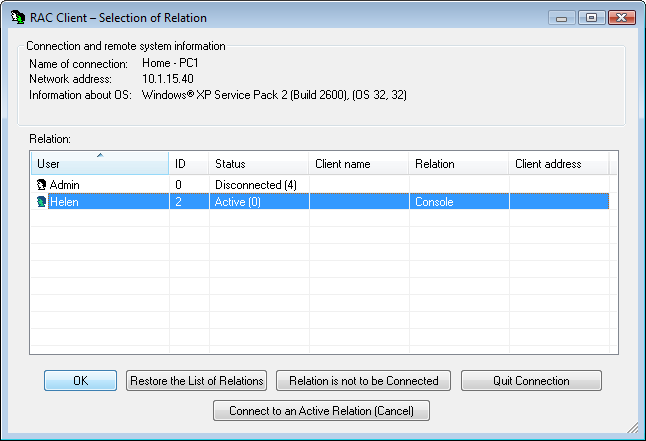
(Sample Selection of relations).
With the Process Control service viewing the full path of the process
and possibility to finish the process tree
2.03
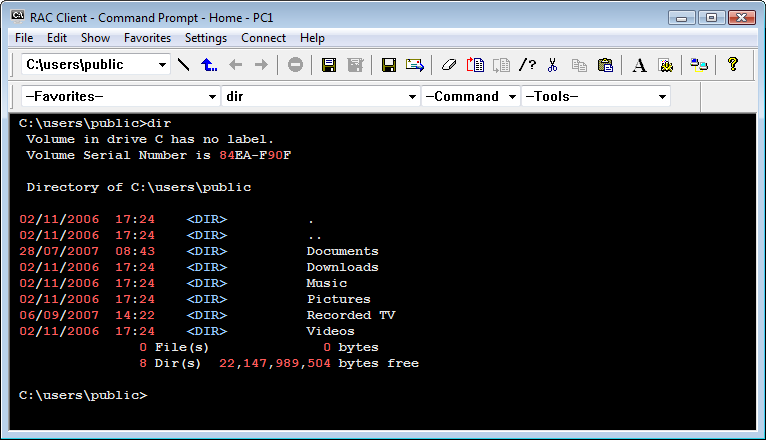
The main news is a new service Command Prompt that allows you to start commands and
tools on a remote system
(sample).
Main properties:
Enables to set individual access to start commands or tools for individual users
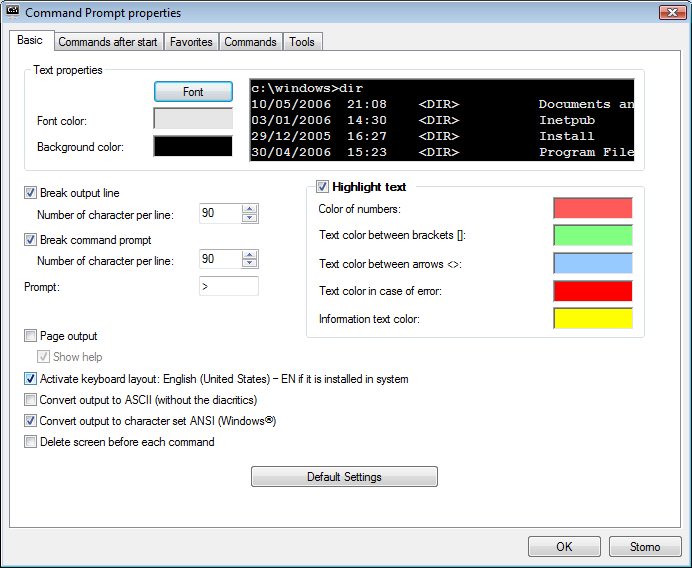
The result of the command is displayed in a window where you can set the background color,
font properties, color highlight, wrapping, pagination...
(sample)
The main window can be displayed on the full screen
The output result can be paged, saved progressively,
saved to a text or HTML file and sent to an e-mail receiver
For navigation you may use:
History of commands
History of previous folders
Favorite commands
System commands and tools
Buttons:
Root folder
Up
Previous folder
Next folder
Go to the beginning of the last command
Go to the end
2.02
Loading of recordings to the Recording list speeded up
Adjustment of texts in the dialog box File Transfer Properties
2.01
Logging on with authorization key enabled for enhancing security
when accessing the remote RAC Server
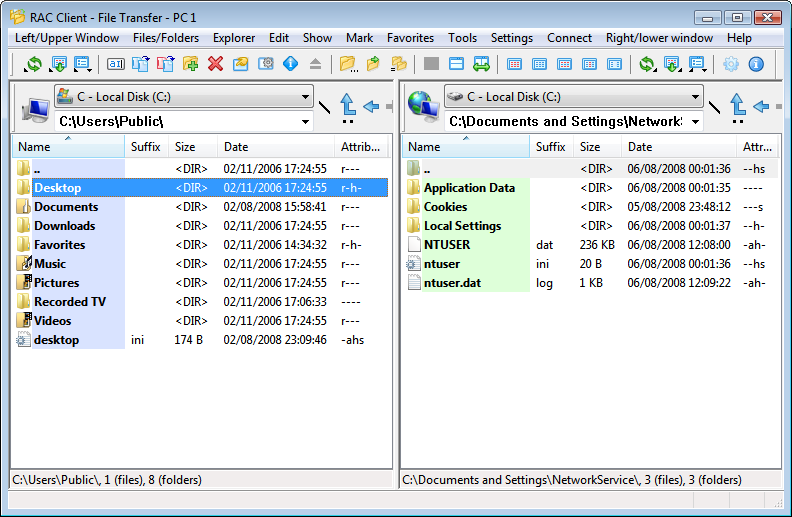
Our main news is a new service File Transfer
(sample),
enabling remote transfer of files and folders.
Main properties:
Enables to set individual access to selected folders for individual users
The files and folders can be copied, moved, renamed, created, deleted,
shortcuts can be created, sent to a recipient, sent to desktop, opened,
opened with a parameter and their attributes changed
Properties of files, folders and units can be displayed
Files and folders can be copied and moved between windows using
Drag and Drop and clipboard (Ctrl+C, Ctrl+V and Ctrl+X)
Files and folders can be copied and moved within the local and remote system
Automatic compression of transferred files
Joining files
folder synchronisation
Filtering and marking the folder content
With local files and folders the possibilities of Windows® Explorer can be used
Enables eject exchangeable medium
The content of the local and remote folder is displayed in two well arranged windows
with which you can
(sample):
Display the windows side by side or under each other
Swap the windows
Switch between the windows with the tabulator or by clicking on the icon of the type of window
Change the appearance of columns
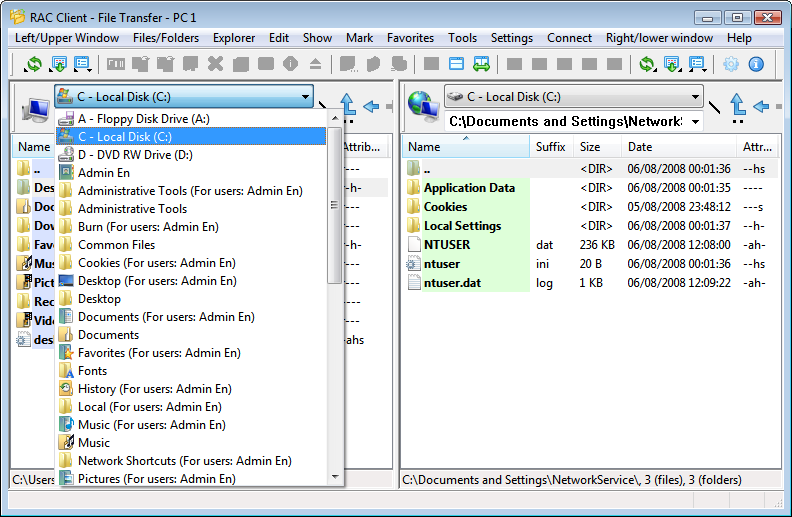
You may use for navigation:
List of available units/folders and special folders
History
Buttons:
Root folder
Up
Previous folder
Next folder
The Switching Computer Off service enables fast switching off,
without the possibility to save data of running applications
The Remote Installation and Uninstallation of the RAC Server can be started even from
the command prompt without the main window
In the basic setting it is possible to set properties of RSA security:
Length of RSA key
Generate a new public key when connection
The option to generate a new public key after some time
The Recording service allows recording only in case of mouse movement,
pushing keyboard or inactive screen saver
2.00
Safer transfer of authorization and encoding information by increasing the length of RSA key to 1024 bits
Remote control or viewing:
Setting the control properties using toolbar
Switching from full screen to normal view by mouse cursor when hovering over the top edge of the screen
Recording to video file when controlling or viewing a remote computer
Automatic scroll of the scroll bar according to the mouse cursor
The current screen can be saved into a file or sent to an e-mail address
Transmission of the upper layered windows
Enhanced locking of screen
Remote recording into a video file including the list recordings and internal player
Remote installation and uninstall of RAC Server
Option of connection through integrated HTTP tunel
Administration tools
Connection records:
Opening links for more selected records
Simple opening through new panel Link
Selecting last selected record when opening the folder
New panel Setting
When registering the server the registration information are stored to a csv file to show
when and on which computer it was used. Information about the used registrations can be viewed
in a new dialog box: "Information about used registrations of RAC Server" in menu
"Information/Information about used registrations of RAC Server".
All setting is divided to more files for faster loading and storing
 French localization
 Portuguese localization
 Italian localization
 Spanish localization
 German localization